Voice Relay calls – NRS information
Voice Relay Calls are ideal if you have difficulty speaking or communicating on the phone and can hear adequately.
You can use your own voice or voice output device (which may be hard for others to understand on the phone). Use any phone in the normal way, relying on the relay operator to repeat what you say if you are not understood.
How it works
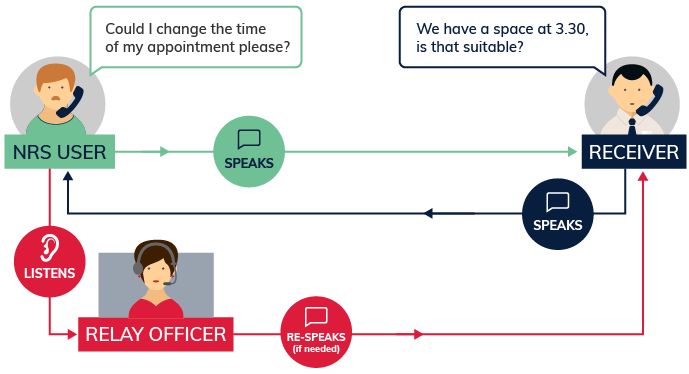
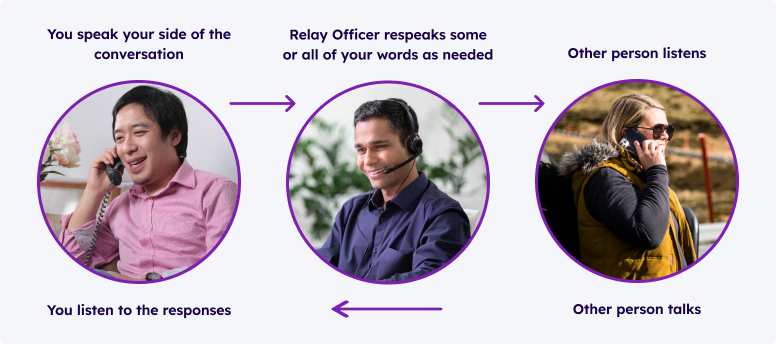
You talk directly to the other person. You can listen directly to what the other person is saying.
If there is any misunderstanding, the relay officer can re-speak all or part of what you say. Relay officers are experienced at listening to people with speech impairments.
Equipment
You can make Voice Relay calls from:
- An ordinary phone or mobile.
- A smartphone with internet connection to use the NRS app
- A tablet with internet connection to use the NRS app
Note that you get extra call-support functions through the NRS app. The app can be downloaded from the Apple App store(opens in new tab) or the Google Play store(opens in new tab).
For more information, please see the Making a Call(opens in new tab) and Call to Emergency Services(opens in new tab) Instruction Sheets.
You may need other equipment depending on your needs. For example, a hands-free or a switch phone, a big button phone, or a voice output device.
Contact the NRS Helpdesk(opens in new tab) for more information about specialised equipment and experts in your area who can help you find it.
Receiving a Voice Relay call
Incoming Voice Relay calls to your smartphone will be received as a regular speak and listen voice call. You cannot use the app for an incoming call.
Further information and useful links:
NRS Voice Relay Access Hub(opens in new tab) Numbers for calling a NRS User(opens in new tab) NRS App – Apple App Store(opens in new tab) NRS App – Google Play Store(opens in new tab)
*The information contained in this document comes from the NRS
This project is funded by the National Disability Insurance Scheme (NDIS) Information, Linkages and Capacity Building (ILC) Program